Hello, @Black-Raven
I would really appreciate the help with removing the whitelisting in my Lenovo IdeaPad Z50-70. Also, if you don't mind, unlock the Advanced menu.
I have already sent you my bios dump.
Thanks in advance!
Topics from outside of this forum. Views and opinions represented here may not reflect those of this forum and its members.
A world of content at your fingertips…
Think of this as your global discovery feed. It brings together interesting discussions from across the web and other communities, all in one place.
While you can browse what's trending now, the best way to use this feed is to make it your own. By creating an account, you can follow specific creators and topics to filter out the noise and see only what matters to you.
Ready to dive in? Create an account to start following others, get notified when people reply to you, and save your favorite finds.
Register LoginHello, @Black-Raven
I would really appreciate the help with removing the whitelisting in my Lenovo IdeaPad Z50-70. Also, if you don't mind, unlock the Advanced menu.
I have already sent you my bios dump.
Thanks in advance!
Hello, @Black-Raven !
Can you help unlock Advanced Menu Settings?
Model is Lenovo IdeaPad S540-15IWL
P.S. You already have my BIOS dump :)
Hi, @Black-Raven
After a Windows 11 update, mini PC Lenovo ThinkCentre M630e stopped turning on. I
need the original BIOS to be repaired so that all serial numbers and
other data match the PC. Reward: 25 EUR, and if everything works fine, I have another identical PC with the same problem for next 25 EUR
Hi, @Black-Raven
I would like to get Advanced Menu Options for my Acer Swift X SFX14-41G
I sent you my SPI dump in private chat.
It is a practical guide for Windows 8/10 and Windows Server 2012–2019 users who need to understand End of Support (EOL) and make a safe, realistic plan (home, business, repair, and legacy hardware).
1)What “End of Support / EOL” actually means:
────────────────────────────────────────
When Windows reaches EOL, Microsoft stops providing regular security updates for that version/edition (outside of special paid programs where applicable).
That does NOT mean your PC instantly stops working.
It means: over time, the OS becomes higher-risk to keep online, and more software/hardware will stop supporting it.
Key impact areas:
• Security: increasing exposure to newly discovered vulnerabilities
• Compatibility: newer apps/drivers may stop supporting the OS
• Browsers: security and TLS support eventually becomes a problem
• Business/compliance: EOL systems often violate security policies
2)If you stay on Windows 10 anyway: what you MUST do:
────────────────────────────────────────
If you must keep Windows 10 for legacy software/hardware, do it in a controlled way:
Minimum safe baseline:
• Keep Windows fully updated to the last available update level
• Use a modern, supported browser while it still exists for Win10
• Keep Microsoft Defender (or reputable AV) enabled and updated
• Keep UAC enabled + use a standard user account for daily work
• Disable unnecessary remote access (RDP, remote tools you don’t use)
• Harden the network: router firewall on, no random port forwarding
• Maintain offline backups (3-2-1 rule if possible)
Best practice for legacy systems:
• Split “online” and “legacy” roles:
3)Your upgrade/migration options (recommended order):
────────────────────────────────────────
Option A — Upgrade to Windows 11 (best long-term)
• Recommended if your hardware supports it and you want a normal daily-use PC.
Option B — Keep Windows 10 + isolate it (best for legacy needs)
• Use it offline or behind strict rules, and move risky activity to a supported OS.
Option C — Move to Linux for basic use (depends on user and software)
• Useful for browsing/office/media on older hardware that cannot run Win11.
Option D — Windows Server systems (2012–2019): act like an admin
• Use a maintenance window plan
• Patch discipline + backups + least privilege
• Keep roles clean and document changes
• If it’s production: decide early (upgrade path or controlled isolation)
4)Quick decision checklist (so you don’t guess):
────────────────────────────────────────
Answer these:
• Is this PC used for banking/email/work logins? → Upgrade ASAP.
• Is it used for one offline legacy program? → Keep, but isolate/offline.
• Is it a family PC for web browsing? → Upgrade or replace.
• Is this a business device/server? → Plan migration, don’t delay.
5)What you can ask in this subcategory (allowed topics):
────────────────────────────────────────
• “Can my hardware run Windows 11?” (specs + TPM/UEFI status)
• Best upgrade route without losing data (backup + clean install plan)
• Server upgrade path guidance (roles, versions, downtime planning)
• Security hardening steps for staying on Win10 temporarily
• Driver issues after upgrade (chipset, storage, network)
• Legacy boot / UEFI / GPT conversion questions
• Dual-boot and VM strategies for legacy apps
6)What is NOT allowed here:
────────────────────────────────────────
• Bypass or piracy instructions (activation cracks, license circumvention)
• Any guidance for unauthorized access, corporate lock bypass, etc.
7)Before you create a new topic, include:
────────────────────────────────────────
• Device type: Desktop / Laptop / Server
• CPU + motherboard/model
• Current Windows version/edition + build (if known)
• BIOS mode: UEFI or Legacy
• Disk layout: GPT or MBR
• Your goal: upgrade / keep Win10 safely / migrate / legacy requirement
• Any errors + screenshots/logs if relevant
Hi, @Black-Raven
I would like to get Advanced Menu Options for my Acer Predator Triton 700 PT715-51.
What information do I have to provide?
Thanks in advanced!
BIOS Doctor Forum Rules
Although the Administrators and Moderators of Bios-Doctor will attempt to keep all objectionable messages off this forum, it is impossible for us to review them all. All messages express the views of the author, and owners of Bios-Doctor will not be held responsible for the content of any message.
You warrant that you will not post any messages that are obscene, vulgar, sexually-oriented, hateful, threatening, or otherwise in violation of any laws or rules of the Forum.
The owners of have the right Bios-Doctor to remove, edit, move or close any thread or any post for any reason without notification.
Due to the real time nature of this Forum, it is impossible for all posts to be monitored and neither the Administrators nor the Moderators will be held accountable for any offensive or illegal post(s) made by the Forum's members.
Administrators can edit, delete, move, or close any posts they wish, with or without reason.
Administrators can remove Moderators access for not fulfilling duties, abusing position, or for any reason they see fit.
Administrators can ban any member on the board with or without reason.
Administrators can do anything on this board they wish. They can change rules at their own discretion without notification.
Moderators are allowed to edit, delete, move, or close any posts they wish for any reason. If you wish to question a decision, you should PM the Moderator in question and ask the reason.
Moderators can ban users on the Forum for violations of the rules within reason.
Any abuse to Administrators/Moderators can result in an immediate ban from the board.
8 ) Bios-Doctor is a Free Speech Forum, provided you do not use any foul language and don't engage in personal attacks.
All topics should be in the correct section of the board, and the allowed topics.
Flooding the board with posts is not allowed. Flooding is posting a large number of useless posts quickly. You should NEVER have two useless posts consecutively, one after the other, as you can edit your post to change any mistakes or add any comments.
SPAM is not allowed on the board in ANY FORM whatsoever. If spam is added on the Forum, then the post will be deleted. Spam can be considered as posting "Thank you" posts to gain status on the board, posting a link for money making purposes, advertisements of material you are trying to promote, or another site without prior approval, posting useless information, or other objectionable material as determined by Admin/Mods. Spamming can result in being banned from the board.
This board is a collection of sections which are dedicated to specific criteria and should NOT be considered a place to incite arguments or debates which are based on moral, political, philosophical, ethical, or cultural issues.
No member should flame another member (shouting, caps-lock, etc.).
No use of what is considered insulting, obscene language, swear words, etc. This may result in a warning or ban, from this Forum.
No racist, cultural or religious defamation, or any posts regarding anything to do with this issue is allowed.
Anything political in anyway will be closed or deleted unless determined to be pertinent by Admins/Mods.
English is the ONLY language allowed on the Forum. Therefore, basic command of English is advisable so that you can understand the rules and also communicate with staff.
If you post in a different language, the thread will be deleted.
No pornography or unsuitable graphic imagery including links to such materials. Anything illegal regarding this issue will give grounds for an immediate ban by Admins/Mods.
19)Do not use comments that are racist, or offend others ethnic origin, cultural, religious defamation, or by any other means. Improper use of avatar and signature is not allowed. Also, no user name in email-id format (eg: bugmenot@hotmail.com) is allowed.
Treat members as you would like to be treated, with courtesy and respect.
All members as well as Administrators and Moderators can have posts deleted.
ANY post which breaks ANY of the rules may be closed or deleted.
Don't ever argue with Moderators/Administrators. Regardless of your point of argument, Moderators/Administrators have the final say.
Signatures that are not visually appealing or have any meaning whatsoever will be removed.
Charges may be applicable for some Software and Services provided on this Forum (Bios-Doctor)
Remark:
We do not condone the sale of pirated software, or any other copyrighted/trademarked materials.The software developers need to be paid for their efforts. If you like their software, you should buy it. This is to allow the software developers to survive and that we will get to enjoy more innovative products.
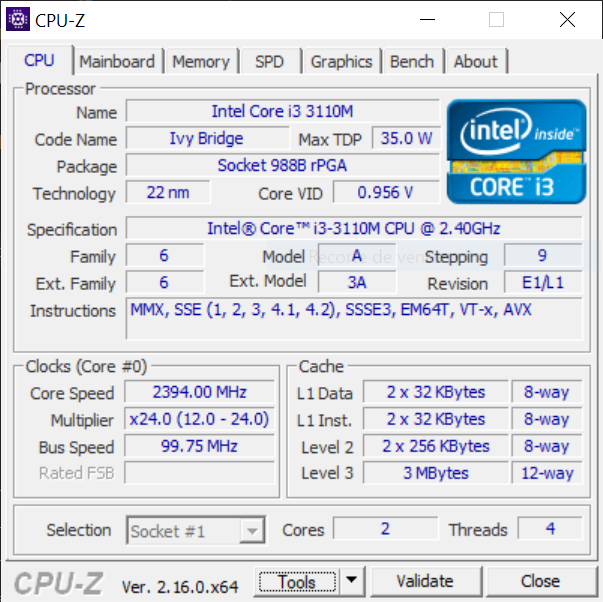
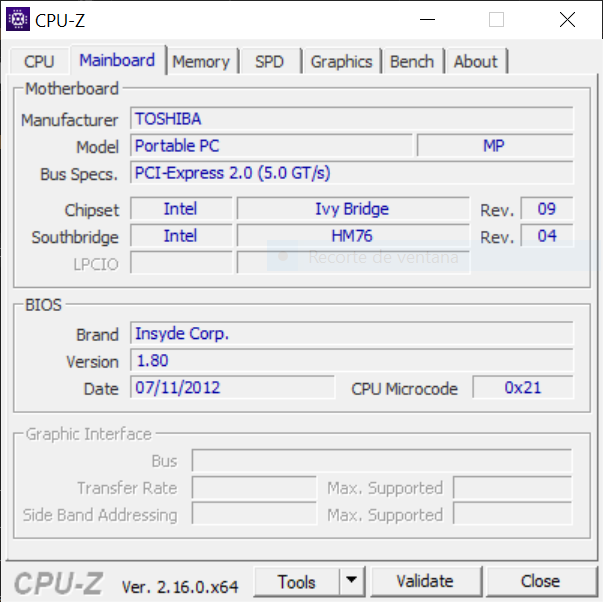
Need the bios to always display to an external display (HDMI or VGA), see if its compatible with an I7 3632QM or any 3rd gen quad-core i7s and if I can Increase the igpu vram
Current CPU is I3 3110M
Also need UEFI if possible
Bios Backup link: https://drive.google.com/file/d/1hGyE7lq...sp=sharing
Board is DK10FG Rev 2.10
Toshiba Satellite L855-SP5202WL
Results.rar: https://www.mediafire.com/file/r65ugrl28mohes1/results.rar/file